
ONE SYSTEM, TWO WAYS IN
Whichever seat you're in, it all lands in the same place.
Fabricators
Subcontractors
TenderLog
Bids. Jobs. Deliveries. One system.
VERSION 1
Fabricators
You win work by tendering. Log every bid, never miss a follow-up, and see exactly which builders you win with and what it's worth.
See the Fabricator version ↓
VERSION 2
Subcontractors
Your work comes in by email and phone. Log each enquiry, quote it, split the job into phases, and track POs, call-ups and deliveries through to completion, with your whole team alerted the moment a PO lands.
See the Subcontractor version →
SEE IT IN ACTION
Watch how TenderLog works
A quick 2-minute tour: from tender enquiry to follow-up, feedback and reports.
THE PROBLEM
You're not losing jobs. You're losing track of them.
A tender can sit open for months. A job gets awarded and buried in a group chat. An order goes out and nobody follows up until the client rings chasing it. None of that is a skill problem — it's a tracking problem, and it's quietly costing you work you already priced.
Weeks
between something going out and getting a real answer back.
Dozens
of open bids, jobs, or orders can be in flight across the team at once.
Zero
follow-ups left to memory — reminders land in your email automatically.
1
missed follow-up is revenue quietly walking out the door.
INSIDE TENDERLOG
Seven workspaces. One follow-up system.
From the moment a job is priced to the day it's awarded — every step, every builder, every deadline lives here.
01 Dashboard
Open TenderLog and see, in seconds, exactly what needs attention today — total value currently in progress, value won this year, how many tenders are active, and how many are waiting on a follow-up call right now.
- "Pending follow-up" queue — every open bid past its next follow-up date, worst-overdue first
- Deadlines in the next 7 days, so nothing is submitted late
- Active tenders by estimator, charted, to balance workload across the team
- Recently added jobs, and a one-click year filter to scope the whole app to this year or all time

02 Jobs
The table where every bid actually gets created and edited — sortable, one row per builder on a job, with quick status cards across the top (Pricing, Submitted, Awarded, 2nd Pricing, Won, Lost) that double as one-click filters. Click any row to open the full job page: a stage stepper, a documentation link straight to the job's network folder, an internal task checklist, and a running activity log of every note and stage change.
FIELDS TRACKED PER BUILDER ROW
Project name & REF #
Month / sheet
Builder & contact email
Quoted price
Bid due date
Follow-up interval
Last follow-up date
Builder status (Won / Lost / Unknown)
Follow-up sent (yes/no)
Feedback notes
SEARCH & FILTER BY
Estimator
Month
Stage
Free-text: project, REF, or builder
Flagged only
Follow-up sent only
One-click by status card

03 Pipeline
A drag-and-drop kanban board with every job laid out across the real bidding stages — Pricing, Submitted, Awarded, 2nd Pricing, Won, Lost. Drag a card to move it a stage (it's logged in that job's activity history automatically); click a card to jump straight to its full detail page. Export the filtered view as a CSV any time.
SEARCH & FILTER BY
Estimator
Month

04 Calendar
A month grid showing every bid deadline and every upcoming follow-up at once. TenderLog computes each job's next follow-up date automatically from its interval (1 week up to 4 months) and flags it "due," then "URGENT" past a configurable threshold — so a bid can't quietly age past the point where a revised quote still matters. Click any day to see exactly which jobs land on it.
WHAT IT SHOWS
Bid deadlines
Follow-up due
Follow-up urgent (overdue)
Scoped to the year in view

05 Builders
A mini-CRM, built automatically from your real bidding history — no separate data entry. Every builder gets a profile: total tenders quoted, real win-rate percentage, total and won dollar value, contact details, and free-form notes your team can read before the next call.
PER BUILDER, AUTOMATICALLY CALCULATED
Total tenders
Win rate %
Total quoted value
Won value
Full tender history
Contact & notes

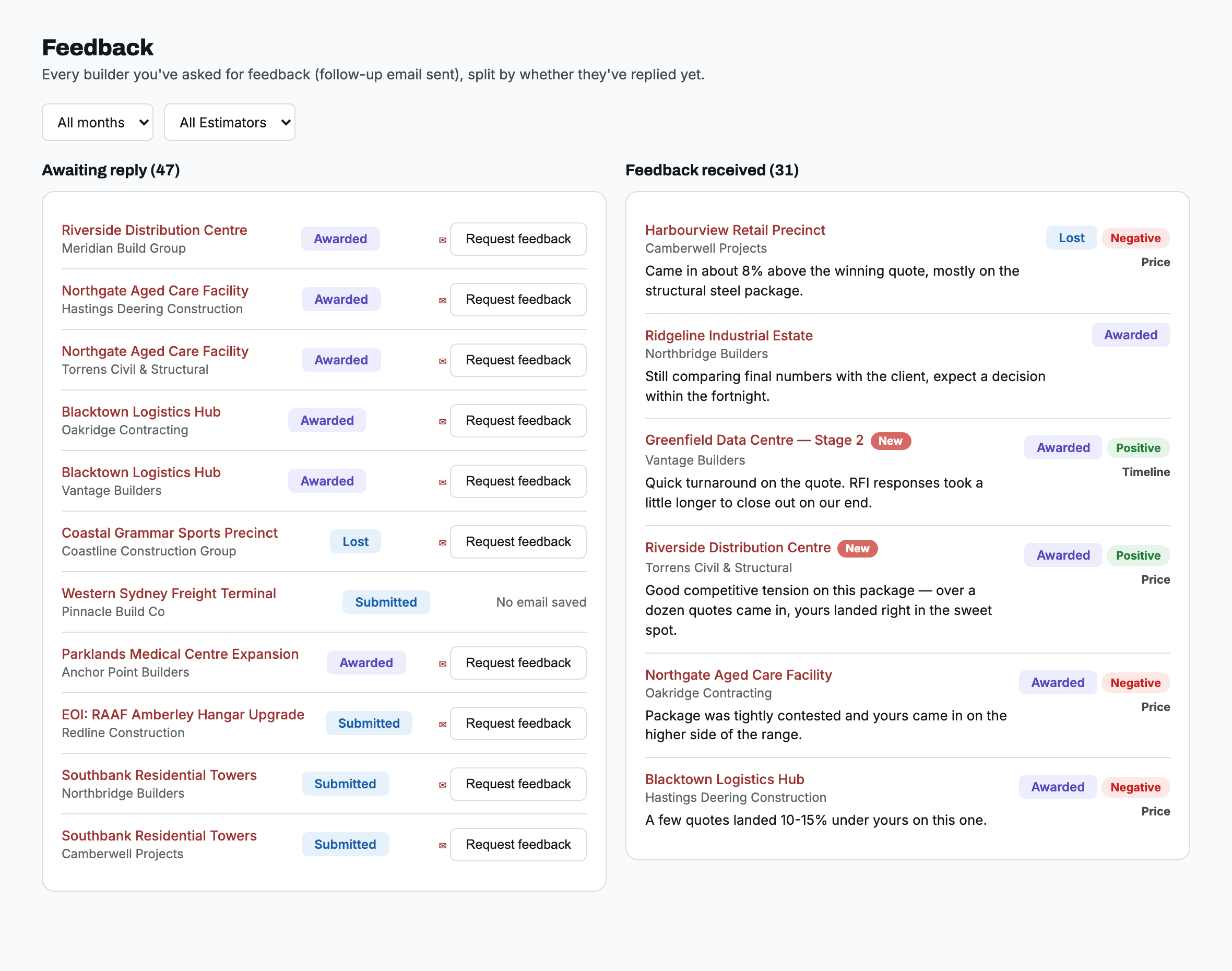
06 Feedback
Closes the loop after a bid is decided. Every builder you've asked for feedback shows up here, split into two columns: still awaiting a reply, or already replied — with a sentiment tag, a reason category, and the actual words the builder used, not just a stage change. Scattered replies turn into a structured record you can spot patterns in over time, instead of a memory of "didn't we lose that one on price before too?"
CAPTURED PER REPLY
Awaiting reply
Feedback received
Sentiment (Positive / Negative)
Reason category
Filter by month or estimator
07 Reports
A self-serve report builder. Filter by any combination of estimator, stage, month, or builder, group the result by whichever of those you want to compare, choose count or total quoted value, and get a live bar or pie chart plus the exact matching-jobs table underneath — exportable, and never touches your underlying data.
FILTER & GROUP BY
Estimator
Stage
Month
Builder (searchable)
Metric: count or $ value
Bar or pie chart

THE SWITCH
Why fabricators & subcontractors switch to TenderLog
Without TenderLog
Work tracked in scattered spreadsheets, if at all
No one owns following up once something's out the door
Deadlines and awards discovered by accident, weeks too late
No record of who's involved in what, or with whom
No visibility into where time and jobs are actually going
With TenderLog
Every bid, job, and order in one shared, always-current file
Follow-up reminders sent straight to your email, so nothing slips
Calendar and dashboard surface what's due before the window closes
A full contact profile with history, win rate, and notes
Live reports on where time and value are actually going
FAQ
Frequently asked questions
What is TenderLog?+
TenderLog is the one place to log every tender, bid, job or order, follow it up and keep the full history — instead of losing track in a spreadsheet.
Who is it built for?+
Fabricators and subcontractors. Each version is set up for the way that type of business actually works, all inside the same system.
What is the difference between the Fabricator and Subcontractor versions?+
The Fabricator version is for businesses that price tenders and submit them to builders: you track each bid by builder, follow it up, record feedback and see your win rate. The Subcontractor version is for businesses that receive enquiries, quote them and deliver the work: a job can be split into phases, each with its own stage, price, purchase order and delivery date, and you track every client from enquiry through to completion. You choose your version when your company is created.
How much does it cost?+
$49.99 AUD per week, per company, with unlimited users and every feature included. There is no setup fee and no lock-in contract.
Is there a free trial?+
There is no free trial, but there is also no setup fee and no lock-in. Book a free demo to see TenderLog working with data that looks like yours. If you subscribe and it is not right for you, cancel any time from Settings.
What is included in the price?+
Every feature of your version, unlimited users and jobs, help setting up your company, guidance importing your spreadsheet, email support, daily backups kept for 7 days, and all future updates — all in the one weekly price. See the full list on the pricing page.
Can I bring in my existing spreadsheet?+
Yes. Import your jobs from Excel, match your columns to TenderLog's fields, check the preview and import. We guide you through it step by step, so nothing gets lost in the switch.
How do follow-ups and reminders work?+
In the Fabricator version, set a follow-up interval on a tender and TenderLog calculates the next follow-up date for you, flags it when it is due or overdue, shows it on the Calendar and emails automatic reminders so nothing is left to memory. The Subcontractor version is built around quotes, purchase orders and deliveries instead: the Calendar shows call-up and delivery dates, and the dashboard lists every quote still waiting on an answer.
Can my whole team use it?+
Yes. Invite your team and give each person the right access — Admin, Editor, Director or Viewer. Everyone sees the same always-current information.
Can I tailor it to the way we work?+
Yes. Admins can rename pipeline stages and add their own, rename or hide pages and filters, choose which reminders are on, and add your logo and contact details to the emails TenderLog sends on your behalf.
Is my data safe?+
Yes. Each company's data is kept separate from every other company's, and every person signs in with their own account and the access level you give them. On top of that:
- Encrypted — your data is encrypted while it travels and while it is stored, and the site is served over HTTPS.
- Automatic daily backups, kept for 7 days — your data is backed up every day without anyone having to remember, so it can be recovered if something ever goes wrong.
- Always-on, production-grade hosting — TenderLog runs on paid, always-on infrastructure (not a free tier that can pause), with a global content network so the site loads quickly and stays available.
- Access you control — Admin, Editor, Director and Viewer roles decide who can see and change what.
Who owns my data, and can I take it with me?+
You do. Your company owns everything it enters into TenderLog, and we never sell it or use it for advertising. You can download your jobs as a CSV at any time. After you cancel, you can ask us for a CSV export of your jobs, clients and notes within 90 days. Files attached to jobs, such as RFQs, quotes and purchase orders, are not part of the export, so keep your own copies.
What support do I get?+
Email support: write to hello@tenderlog.com.au whenever you are stuck or have a question. When you sign up we help you set up your company, and we guide you step by step through importing your spreadsheet.
Can I cancel any time?+
Yes. Cancel from Settings > Billing, or by emailing us. There is no minimum term and no cancellation fee, and you keep access until the end of the week you have already paid for. After that your account becomes read-only, so you can still view and download your data. If you do not subscribe again within 90 days, we delete it.
How do I get started?+
Book a demo and let us know. We will walk you through TenderLog and help you set up your company, so you can start logging jobs the same day.
ENQUIRE
Let's get your team off the spreadsheet.
Tell us a bit about your team and we'll walk you through it live — pricing, follow-ups, and reports, using a board that looks like yours.
Prefer email? Write to us at hello@tenderlog.com.au
1
Send your enquiry
Takes about 30 seconds.
2
We reach out
Within 1 business day.
3
Free demo & onboarding
We set your team up, on us.
No card required · we reply within 1 business day
 TenderLog
The one place to log every bid, job, or order and follow it up until you know exactly where it stands.
© 2026 TenderLog. Built for fabricators & subcontractors.